Dinkar Kamat

Updated 2 years ago

Record any audio effortlessly

Free PC Audio Recorder is an audio recorder developed by Cok Free Software. This multimedia software enables you to easily record any file from various sources, such as the line-in audio from your microphone, the audio stream online, the system audio from your PC sound card, and the in-and-out voices on your computer. It gives you the power to utilize the recorded audio in any manner you prefer it to use.

Record quality audio

The quality of recording this tool offers is superb that it has the capability to give you professional sound output with no charging options required. It is considered one of the best in the market as it produces crystal clear sound from line-in equipment. 

On top of that, it enables you to record audio without the need for a physical microphone. The app already has its built-in mic provided. Not only that, but it also permits you to record high-quality VoIP voice conversations from other applications such as Skype, Viber, Windows media player, Real player, iTunes, etc.

User-friendly interface

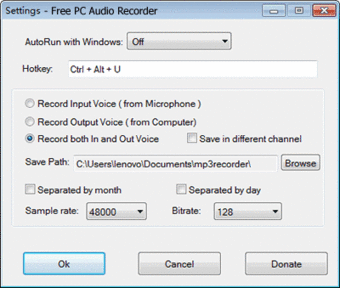
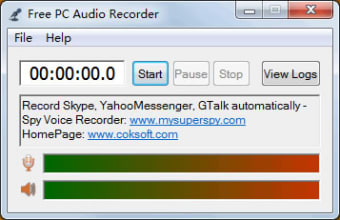
Free PC Audio Recorder comes with a user interface specifically designed for beginners in audio recording. Once you launch the program, it redirects you to the homepage, which contains “Start,” “Pause,” and “Stop” buttons that helps you operate the recording well. It’s menu settings offer you vital sound options such as sample rate, bitrate, and audio source that is important for you to carefully select as it affects your output audio. 

Lightweight alternative program

Amongst other audio recorder programs, Free PC Audio Recorder is relatively one of the most lightweight to ever exist. With this, it aids you to free up some space in your storage disk. Moreover, it contains no advertisements or plug-in components, which makes the software clean and safe to use.
Dinkar Kamat

Dinkar has more than 10 years of experience in content creation, including technical articles, travel writing, and product strategy. His expertise spans SEO, digital marketing, and structured editorial work. He focuses on producing content that is both accurate and accessible for diverse audiences.

  • Pros

    • Lightweight audio recorder program
    • Has built-in mic
    • Records high-quality VoIP voice conversations
    • Intuitive interface
  • Cons

    • No audio editing feature offered
 0/2

App specs

  • License

    Free

  • Version

    3.1
  • Latest update

  • Platform

    Windows

  • OS

    Windows 2000

  • Language

    English

  • Downloads

    592.6K

    Last month's downloads

    • 1.5K
  • Size

    1.17 MB

  • Developer

Program available in other languages


User reviews about Free PC Audio Recorder

3.5

2 reviews

Add review

Main reviews for you

  • Anonymous user

    The files will not play back on any of my software in Windows 10.. The files will not play back on any of my software in Windows 10.

  • Anonymous user

    It was perfrfect software. it was very good and i liked it very much for my computer as it works

More

You may also like

Alternatives to Free PC Audio Recorder

Explore Apps

Latest articles

Laws concerning the use of this software vary from country to country. We do not encourage or condone the use of this program if it is in violation of these laws.
Softonic

Is Free PC Audio Recorder safe?

100/100

Score result: Clean

This file passed a comprehensive security scan using VirusTotal technology. It is safe to download.

  • Virus free
  • Spyware free
  • Malware free
  • Verified by Security Partners

    VirusTotal logo

Scan Info

Last scan
Sunday, December 31, 2023
Scan provider
VirusTotal · Full report

File Integrity

File
pcrecorder_setup.exe
SHA256
d58cecf0a76dc9300171657ae1f49ff3eeb8a9e94afb84749909c0ab4791a9f3
SHA1
94c0c56b8ae6970217f87c3026f62064fe6c6b7d

Softonic security commitment

Free PC Audio Recorder has been thoroughly scanned by our advanced security systems and verified by industry-leading partners. This file comes from the official developer and has passed all our security checks, showing no signs of viruses, malware, or spyware. For more information, visit our Security and Trust Center